Commands
Several methods are available to create a temporary table/view, with the most common method being the CREATE command. Use the CREATE TABLE command to create a temporary table. Use the CREATE VIEW command to create a temporary view. You can also use the INTERSECT, JOIN, PROJECT, SUBTRACT, UNION, ATTACH, and SATTACH commands to create temporary tables.
TEMPORARY/INMEMORY Parameter
The main difference between using the original command (CREATE, PROJECT, SATTACH, etc.) to create a table or view and creating a temporary table/view is the TEMPORARY or INMEMORY parameter in the command syntax. The TEMPORARY parameter informs R:BASE to use temporary files for the table/view. Likewise, to create an in-memory temporary table/view, the syntax is the same, only the INMEMORY parameter is used in the command syntax. Below are basic examples for creating a real, temporary, or in-memory table:
CREATE TABLE `PaymentTerms` +
(`PaymentTerm` TEXT (20))
CREATE TEMPORARY TABLE `tPaymentTerms` +
(`PaymentTerm` TEXT (20))
CREATE INMEMORY TABLE `iPaymentTerms` +
(`PaymentTerm` TEXT (20))
Using the above CREATE commands, PaymentTerms would be a permanent table, tPaymentTerms would be a temporary table, and iPaymentTerms would be an in-memory temporary table.
Data Browser
Other methods to create a temporary table/view are available within the Data Browser when viewing the data. The "Edit > Save Results As..." menu option allows for the displayed data to be saved as a temporary or in-memory temporary table/view with a different name.
Query Builder
The Query Builder may also be used to create a temporary table/view from a query. The "File > Save Query As View/Save Query As Table" menu options allow for the displayed query to be saved as a temporary or in-memory temporary table/view.
Data Designer
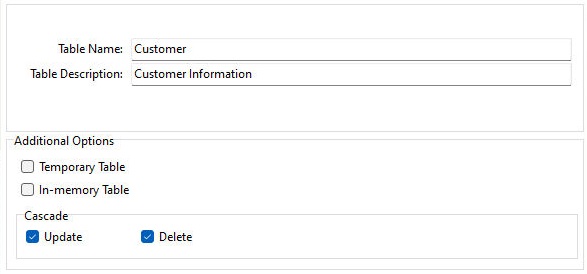
Within the Data Designer, settings are available within the Table group which allow a temporary or in-memory temporary table to be saved as a real table. The settings can also be used to save an existing table as a temporary/in-memory table.
Database Explorer
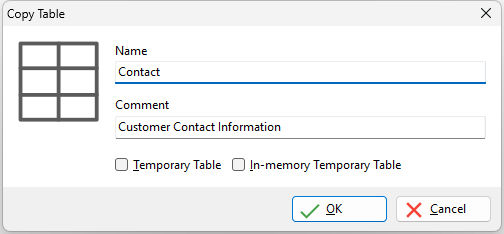
Within the Tables group of the Database Explorer, a table may be selected and copied, where the displayed dialog offers options to create the copy as a temporary or in-memory temporary table. Likewise, within the Views group, a selected view may be copied, where the dialog offers options to create the copy as a temporary or in-memory temporary view.