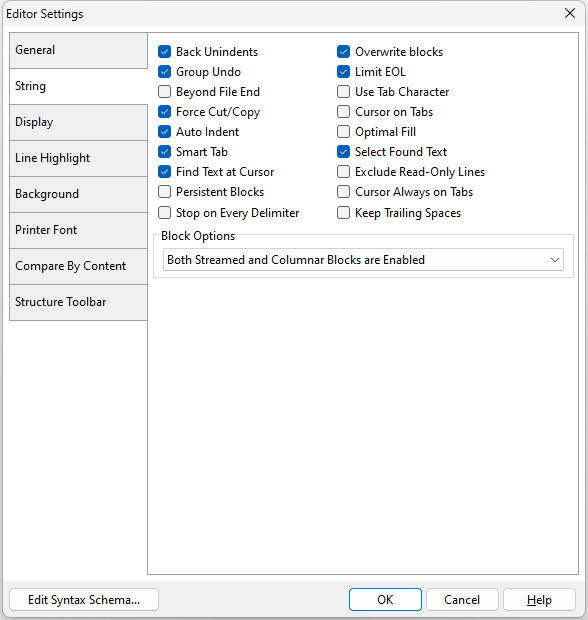
•Back Unindents - enables/disables alignment of the cursor with the previous indentation level from the preceding line when you press the BACKSPACE key •Group Undo - enables/disables the undoes of your last editing command as well as any subsequent editing commands of the same type •Beyond File End - enables/disables position of the cursor beyond the last character •Force Cut/Copy - enables/disables cut and copy, even when there is no text selected •Auto Indent - enables/disables the cursor to be placed under the first non-white space character in the preceding line when you press the ENTER key •Smart Tab - enables/disables the cursor to be placed under the first non-white space character in the preceding line when you press the TAB key •Find Text at Cursor - enables/disables placement of the text at the cursor into the Text To Find list box in the Find Text dialog box •Persistent Blocks - enables/disables to keep a marked block (selected text) selected even when the cursor is moved •Stop on Every Delimiter - Enables/disables cursor navigation mimicking the R> cursor, where pressing [Ctrl] + [Arrow] Keys will move the cursor to the far left character for every word or combined character string. •Overwrite Blocks - enables/disables to replace a marked block (selected text) with whatever is typed next •Limit EOL - enables/disables the cursor from being positioned past the end of a line •Use Tab Character - enables/disables insert of the Tab character into the text when the user presses Tab button •Cursor on Tabs - enables/disables the caret to be moved by tabs •Optimal Fill - enables/disables the beginning of every auto-indented line with the minimum number of characters possible, using tabs and spaces as necessary •Select Found Text - enables/disables to select the text that was found in a Find operation •Exclude Read-Only Lines - enables/disables excluding read-only text •Cursor Always on Tabs - enables/disables pressing right and left arrows will move the cursor on tabs •Keep Trailing Spaces - keeps/removes trailing spaces at the end of code lines •Block Options - options for block selection in command files
Edit Syntax Scheme... - displays the Scheme Editor to alter the syntax highlighting that affects the way code is displayed in the editor |
|