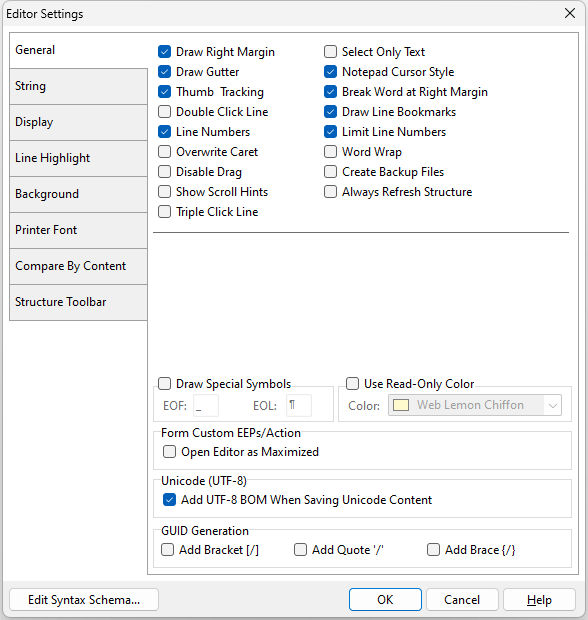
•Draw Right Margin - enables/disables a right margin in the command file •Draw Gutter - enables/disables a gutter on the left margin •Thumb Tracking - enables/disables the command file movement before the thumb tab is released while sliding the scroll bar •Double Click Line - highlights the line when you double-click any character in the line •Line Numbers - enables/disables line numbering in the gutter •Overwrite Caret - enables/disables overwrite cursor when the editor is in overwrite mode •Disable Drag - disables drag and drop of selected text •Show Scroll Hints - displays the line number when dragging the vertical scroll bar •Triple Line Click - highlights the line when you triple-click any character in the line •Select Only Text - only text is selected when additional lines selected •Notepad Cursor Style - allows cursor to not stay on first character in line when left arrow is pressed •Break Word at Right Margin - enables/disables word break at the right margin when word wrap is on •Draw Line Bookmarks - enables/disables an arrow placement at the cursor location of an added bookmark •Limit Line Numbers - enables/disables limitation line numbers to the length of a command file •Word Wrap - enables/disables wrapping text •Create Backup Files - enables/disables the creation of a backup file once a file is saved (file = CUST.APP backup = CUST.~APP , file = RESTORE.RMD backup = RESTORE.~RMD) •Always Refresh Structure - refreshes the Structure tool bar when switching between open files and when the file is saved •Remember Current Session - restores a group of commands which were open in the prior session
•Draw Special Symbols - allows the display of special symbols for the end of a file (EOF) and the end of a line (EOL) •Use Read-Only Color - allows the display of a color background for read-only lines •Form Custom EEPs/Action - enables/disables the editor window to be maximized when using Custom EEPs and Actions •Unicode (UTF-8) - specifies whether to add a UTF-8 BOM to a saved file •GUID Generation - specifies the GUI value format when selecting the Insert GUID menu option
Edit Syntax Scheme... - displays the Scheme Editor to alter the syntax highlighting that affects the way code is displayed in the editor |
|