Use the REPORTS command to start the Report Designer.
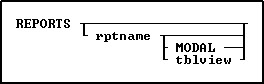
Options
MODAL
Launches a report in the designer from a command block, command file, or EEP. The Report Designer must be closed in order to continue the next command.
rptname
Specifies an existing report whose definition you want to modify.
tblview
This options is for DOS only. Specify both rptname and tblview when you want to build a new report. R:BASE displays the Report Designer window where you can begin to define the new report. Use rptname alone to specify the name of an existing report you want to modify.
About the REPORTS Command
When designing a report, the following can be performed:
•Define a Quick or a Custom report that prints or displays data from a table or view
•Group data by unique column values with breaks
•Define variables and include them in the report
•Look up values from columns in other tables
•Draw lines, borders, 3D boxes, and check boxes
•Print a report to a printer, the screen, or a file
•Print summary information, such as subtotals
•Create display formats for data
•Place a graphic image
•Create a sub report
•Display barcodes and 2-dimensional barcodes
•Create a PDF form report
•Place a page style background for all pages
Example
The following command launches the Invoice report within the Report Designer.
REPORTS Invoice