Use the ON DISCONNECT command to run a command file, code stored in a table, or stored procedure before disconnecting from a database. The ON DISCONNECT/EXIT command can also be used to run a command file after disconnecting from a database or closing the R:BASE session.
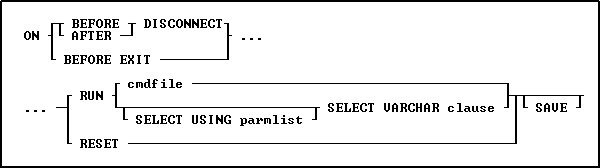
Options
AFTER
Indicates the command file should be run after the DISCONNECT.
BEFORE
Indicates the command file should be run before the DISCONNECT.
BEFORE EXIT
Indicates the command file should be run before exiting R:BASE.
CALL procname
Indicates the stored procedure should be called before the DISCONNECT.
DISCONNECT
Indicates the command file should be run when disconnecting from database.
RESET
Clears out the ON DISCONNECT/EXIT command recorded in the database.
RUN
Runs a command file or procedure stored within a table.
cmdfile
Specifies the name of the command file to execute.
SAVE
Specifies that the parameters in the cmdfile or from the RESET will be saved to the database. Any options without the SAVE parameter will only be active for the current session.
SELECT VARCHAR clause
Specifies a column defined with the VARCHAR data type from a table, from which you can run the contents. The SELECT clause must limit the data to only one row; otherwise, an error is returned.
USING parmlist
Lists the values the command file uses when it runs. The parameter list can contain up to 18 values. The first value in the list is referenced in the executed file as %1, the second as %2, and so on through %9. They are treated just like other variables. To reference the contents of these variables, preface the variable name with a dot (.); for example, set v1 =.%1.
About the ON DISCONNECT/EXIT command
The ON DISCONNECT/EXIT command is useful for running a specific command file whenever a database is disconnected or the R:BASE session is closed. An example would be to run a command file after disconnecting to reinforce desired settings. The ON EXIT command can be used for logging events within custom transaction tables.
Examples:
Example 01:
-- Calls the RunLog stored procedure before the database is disconnected
ON BEFORE DISCONNECT CALL RunLog() SAVE
Example 02:
-- Runs the ExitDB command file before R:BASE is closed
ON BEFORE EXIT Run ExitDB.rmd SAVE