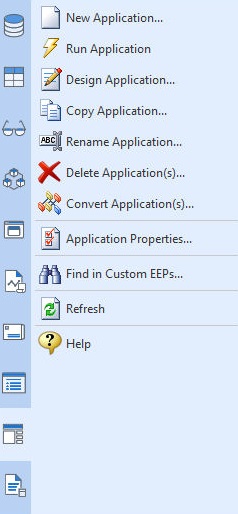
The "Applications" section of the Database Explorer provides menu options to manage your R:BASE database applications.
•Browse... - opens a "Browse" dialog for you to browse your computer for an R:BASE Application File (.RBA). Please be aware that using this selection does change the current working directory to the directory you choose in the "Browse" dialog. •New Application... - creates a new Application File. Selecting this option will display options for creating a new application. •Run Application - runs the selected Application File •Design Application... - open the selected Application File in the Application Designer for editing •Copy Application... - copies the selected Application File to a new file •Rename Application... - renames the selected Application File to a new name •Delete Application(s)... - deletes the selected Application File •Convert Application(s)... - converts the selected Application File to an External Form •Application Properties... - displays the file properties for the selected Application File •Find in Custom EEPs... - opens a Find in Custom EEPs search utility to locate specific text within all Application Custom EEPs •Refresh - refreshes the Application File list in the right pane of the Database Explorer •Help - opens the Database Explorer Help
When right clicking in the Work Space, the menu options are also available.
|
|